D365FO Integration Architecture: A Real-World Approach with REST APIs and Azure API Management (Part 1 of 2)
Architecture decisions from a real D365FO project: three integration lanes, Azure API Management as control layer, logging and limits.
- Published
- Versions
- D365FO
- 10 min read
Table of Contents
- Introduction
- Integration Challenges
- Architecture Design Decisions
- Azure API Management
- Implementation Details
- Limitations and Trade-offs
- What’s Next
1. Introduction
In today’s increasingly interconnected digital landscape, integration is no longer just a technical necessity—it is a strategic capability.
During my latest implementation of an ERP system for a manufacturing company, I had the opportunity to design and deliver a robust integration architecture focused on cloud-first principles and interoperability through REST APIs.
This article is the first of a two-part series.
In this first part, I will focus on the architectural approach, the decisions made, and the reasoning behind them.
In the second part, I will take a more hands-on perspective, showing practical examples of how to implement Azure API Management (APIM) and Application Insights as a logging platform, including real use cases and configurations.
One of the recurring challenges in enterprise projects is determining the most effective way to exchange data with external systems. Opinions often diverge significantly: some approaches remain anchored to legacy paradigms, while others fully embrace modern, API-driven ecosystems. In reality, the optimal solution always lies somewhere in between—carefully tailored to the specific context, constraints, and maturity of each organization.
This article aims to share the lessons learned from this experience, with a particular focus on adopting Azure API Management (APIM) as a central integration layer. I will explore the architectural decisions, the challenges encountered, and the tangible benefits achieved—providing practical insights for anyone facing similar integration scenarios in modern ERP implementations.
2. Integration Challenges
In real-world projects, integration is rarely a greenfield exercise. This implementation was no exception. The client operated in a complex manufacturing environment, where the ERP system had to coexist with a wide range of satellite systems, each with its own history, constraints, and level of technological maturity.
The landscape included major of time:
- Production management tools
- Warehouse systems
- Advanced planning solutions
- CRM
- EDI solutions
- Others
Some of these systems were cloud-based and API-ready, while others were still running on-premise with more traditional integration patterns. This mix created an immediate challenge: there was no single “correct” way to approach integration.
The Starting Point
Before introducing the architecture I have implemented, it’s worth briefly describing the starting point.
The client’s integration landscape was heavily centered around a SQL database acting as a hub. In practice, almost every system—both internal and external—was exchanging data through this central point, using staging tables as the main integration mechanism.
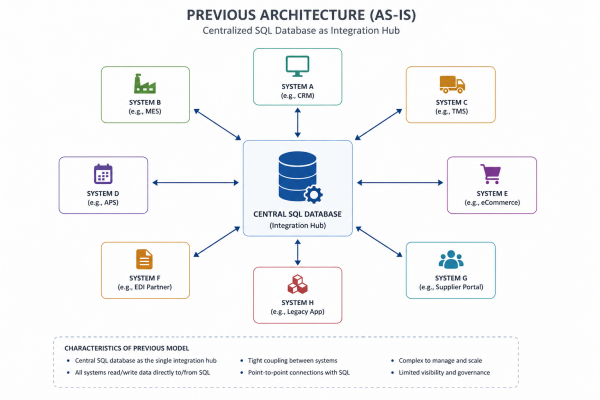
At first glance, this approach provided a simple way to decouple systems and manage data exchanges. However, over time it also became a bottleneck:
- Real-time scenarios were difficult to support
- Data consistency depended on batch processes
- Monitoring and troubleshooting were fragmented
- Adding new integrations meant increasing complexity
- Difficult to coexist with cloud solutions, like the D365FO
This SQL-centric model was not uncommon, especially in environments with a strong on-premise history. But it clearly showed its limits when moving toward a more modern, cloud-oriented architecture.
Legacy vs Modern Approaches
One of the most recurring discussions during the early stages of the project was around how systems should communicate.
On one side, there were approaches rooted in well-established practices:
- File-based integrations (often via shared folders or SFTP)
- Direct database access or staging tables
- Batch-driven processes with scheduled jobs
On the other side, there was a clear push toward more modern paradigms:
- REST APIs
- Near real-time communication
- Event-driven patterns (at least conceptually)
In theory, moving everything to a fully API-driven architecture sounds like the obvious choice. In practice, that assumption quickly breaks down when you consider:
- Existing investments in legacy systems
- Performance constraints
- Organizational habits and operational processes
- The actual capabilities of third-party software
The result is that integration architecture becomes an exercise in balance rather than purity.
Before making any architectural decision, it was essential to clearly understand the client’s context. Not in theory, but in practical terms—how systems actually worked, what was already in place, and what the business really needed on a daily basis.
A few key points quickly emerged:
- Some systems were still on-premise
- Not everything needed to be real-time
- There were already existing integrations
- There was no central visibility on integrations
- Different systems, different capabilities
Taken together, these constraints made one thing clear: the architecture had to adapt to the reality of the client, not the other way around.
3. Architecture Design Decisions
Once the constraints were clear, the architecture was designed with a pragmatic mindset: standardize where possible, adapt where necessary. The goal was not theoretical perfection, but something that would actually work in production without creating unnecessary friction.
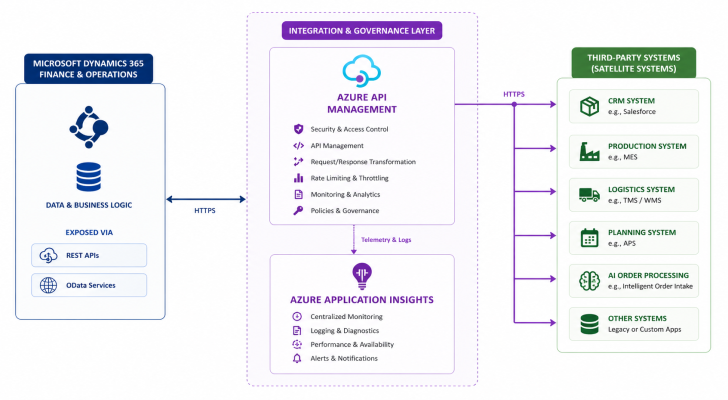
Process integrations (real-time): These include transactional flows such as orders, logistics, and production signals. They were all standardized through REST APIs exposed via APIM, ensuring consistency and control. This also aligned with a strong business requirement: the need for a centralized monitoring layer, where all integrations could be tracked, analyzed, and supported.
Daily integrations (high-volume): These involve large datasets like inventory, production data, or reporting feeds. Instead of forcing them through APIs, they were handled via a data platform and pre-existing SQL staging database, making them more efficient and scalable.
File Based integrations: File-based integration was necessary to cover all pre-existing flows where the expected output was a file, including standard files or EDI interchange files.
4. Azure API Management
At the center of the entire integration architecture sits Azure API Management (APIM). Not as the only component, but as the control layer that makes everything consistent, governable, and observable.
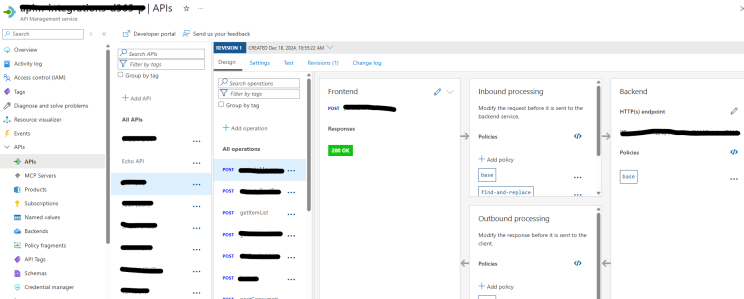
APIM naturally positioned itself as the right tool because it allowed to:
- Centralize all inbound and outbound integrations
- Standardize communication patterns
- Decouple external systems from the ERP
Reducing Complexity in the ERP
One of the most tangible benefits of this approach was a drastic reduction in development complexity within the ERP.
Instead of implementing:
- Custom transformations
- Logging mechanisms
- Protocol adaptations
- Integration-specific logic
The ERP was focused on a single responsibility:
Exposing clean and reusable REST services
All additional concerns were delegated to APIM.
This led to a dual advantage:
- Faster development cycles
- Reduced architectural complexity
Decoupling and Abstraction
By introducing APIM as an intermediary layer, integrations became fully decoupled:
- External systems no longer depend on ERP internal structures
- Changes inside the ERP do not directly impact consumers
- Different systems can use different data formats
This abstraction enabled the creation of generic and reusable APIs, independent from specific consumers.
Centralizing Complexity Where It Belongs
APIM became the place where complexity is intentionally handled:
- Transformation layer
- Routing and orchestration
- Security and access control
- Logging and monitoring (Application Insights)
A More Sustainable Integration Model
The result is not just a cleaner architecture, but a more sustainable model:
- ERP focused on business logic
- Integration logic externalized
- New integrations added with minimal impact
5. Implementation Details
After defining the architecture and identifying APIM as the central integration layer, the focus shifted to implementation. This is the phase where design choices are validated against real constraints—timelines, team structure, system limitations, and operational needs.
The objective was not to build a perfect or overly engineered solution, but to implement something consistent, maintainable, and aligned with the project context. In several cases, this meant making pragmatic decisions, balancing best practices with what was actually needed and sustainable over time.
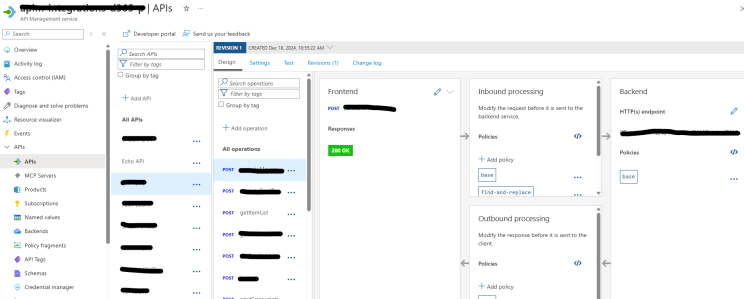
The following sections describe the key implementation aspects, highlighting what was done in practice.
From an environment perspective, three separate APIM instances were created to reflect a typical lifecycle setup:
- A Development environment using the Consumption tier. This instance was mainly used for development activities and testing scenarios. It could call backend environments directly, but in most cases, mocked responses were returned to decouple development from backend availability.
- A Test environment using the Developer tier, connected to the test systems. This represented the first scenario where real integrations were executed and validated end-to-end.
- A Production environment using the Basic tier.
The Consumption tier comes with some limitations, but in practice it proved to be more than sufficient for development activities, especially considering its cost-effectiveness. For production, the choice of the Basic tier was driven by a balance between required features and monthly costs—it represented the minimum level that could reliably support the expected workload.
Each APIM instance was paired with its own Application Insights resource. This separation proved particularly useful in practice, especially during testing phases, where having dedicated visibility per environment made it much easier to validate behavior before moving to production.
In practical terms, it allows you to see who is calling what, when the call happens, and how the system responds. For every request, you can track the full execution flow: which API was triggered, which backend system was involved, how long the operation took, and whether it completed successfully or failed.
This becomes extremely valuable in day-to-day operations. When something goes wrong, you don’t need to guess—you can quickly identify where the issue occurred, whether it’s on the caller side, inside APIM, or in the backend system. The same applies to performance: slow integrations can be detected and analyzed by looking at execution times and dependencies.
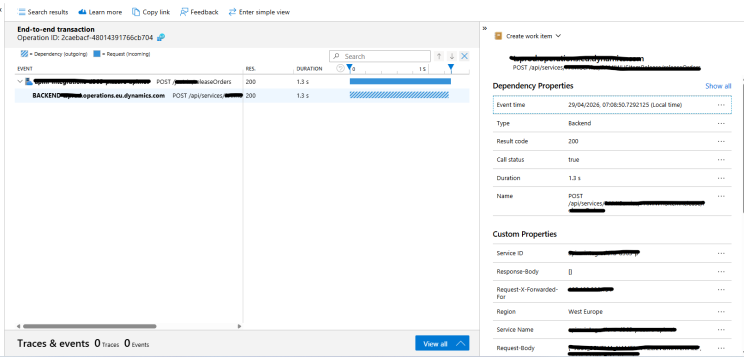
Due to the payload size limitations of Application Insights (as described in the limitations section), a complementary approach was introduced.
While Application Insights was used for tracking, metrics, and general logging, the full JSON payloads (both request and response) were stored in a dedicated Storage Account.
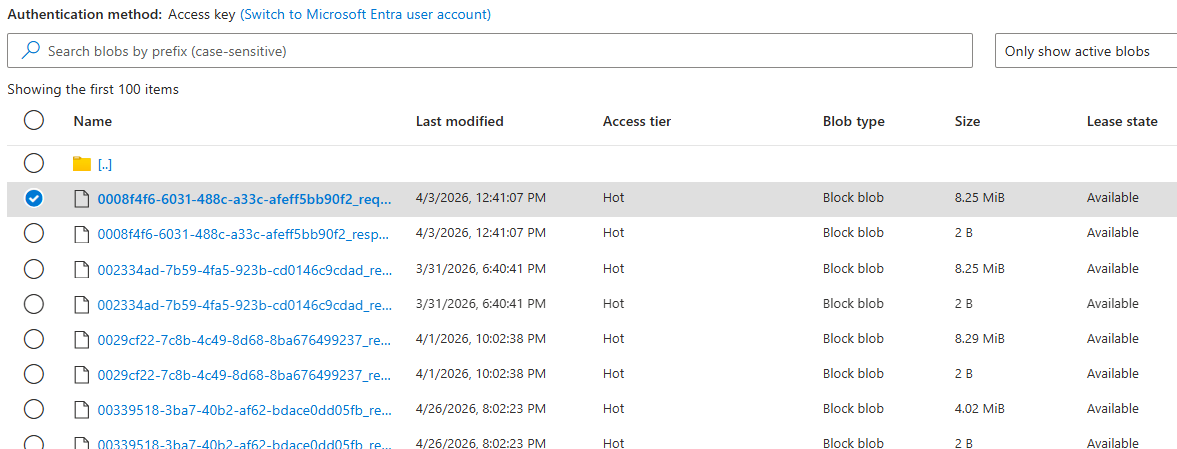
This allowed us to:
- Always retain the complete payload, without truncation
- Have a reliable source for detailed troubleshooting
- Support audit and traceability needs when required using the same request id
6. Limitations and Trade-offs
These are a couple of practical limitations that emerged during implementation.
Execution Timeout
APIM enforces a maximum execution duration of around 5 minutes. This means that long-running operations cannot be handled through a single synchronous call.
In practice, this required:
- Rethinking some integrations as asynchronous flows
- Avoiding heavy processing behind APIs
Payload Limits in Application Insights
Application Insights offers excellent logging and full-text search capabilities, which are very useful for debugging.
However, it also has payload size limitations, meaning large JSON messages can be truncated. This makes troubleshooting more complex in certain scenarios.
For this reason, a complementary approach was introduced using Blob Storage to store full payloads. Some options were explored to enable search capabilities on top of this, but in practice this has not been a strict requirement so far in production.
7. What’s Next
While this first part focused on architectural decisions and design principles, the next step is to translate these concepts into something tangible and reusable.
In the second part of this series, I will move to a more hands-on approach by building a reference APIM model, designed to serve as a starting point for real integration scenarios.
The objective is not to create a theoretical sample, but a practical and reusable foundation, based on the same principles described in this article.
More importantly, the next article will go deeper into what APIM actually does in practice, and why it becomes such a strategic component in this type of architecture—not just from a technical perspective, but also in terms of governance, control, and long-term sustainability.
It will also clarify an important point that is often misunderstood: what APIM really does, and just as importantly, what it does not do.
More specifically, I will:
- Create a Git-based APIM template, structured to support standard integration patterns
- Implement a basic integration layer between the ERP and external systems
- Apply key capabilities discussed in this article, including: Security and access control ,Routing and backend abstraction, Payload transformation, Logging and monitoring and Payload persistence for troubleshooting and audit
The goal is to provide a concrete starting point that can be adapted and extended in real projects, reducing the effort required to design integrations from scratch.
Disclaimer
This article was prepared with the support of AI tools. However, all concepts, architectural decisions, and insights are based on real project experience and hands-on implementation.
Each section reflects a practical perspective shaped in the field—not a simple aggregation of documentation, but my own view on the topic.