Overcoming INCOMPLETE Status in Cloud-Hosted Dynamics 365 Environments: Renewing WinRM SSL Certificates
How renewing the WinRM SSL certificate brought cloud-hosted D365FO environments back from INCOMPLETE or Preparation Failed status.
- Published
- Versions
- D365FO
- 3 min read
The “INCOMPLETE” status in cloud-hosted Dynamics 365 For Finance and Operations machines, a common reaction among many is to consider the drastic step of discarding the virtual machine (VM) and starting anew. This inclination stems from the frustration of seemingly insurmountable technical hurdles and the mistaken belief that setting up a new machine might be quicker or easier. However, this approach is fundamentally flawed and unnecessarily time-consuming.
The truth is, the process of recreating a VM from scratch, reconfiguring it, and reinstalling all necessary components and customizations can take hours, if not days, of meticulous work. This not only leads to significant downtime but also diverts valuable resources away from productive tasks, creating a ripple effect of inefficiency across projects.
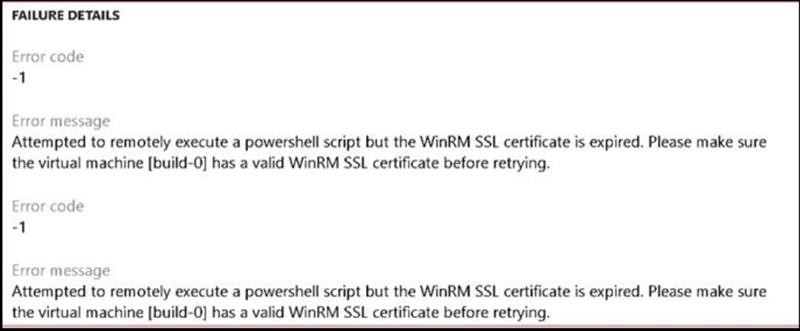
When encountering the “INCOMPLETE” status, it is advisable to consult the LCS environment closely. Often, LCS will offer error logs or problem descriptions that pinpoint the exact nature of the issue. If the problem is related to an expired WinRM SSL certificate, you sure can use this procedure, but sometimes not, sometimes VM goes to this state without any other errors, and sometime in my experiece renew WinRM certificates resolve the problem.
This solution is also applicable:
- In scenarios where the application of a package on a cloud-hosted environment does not initiate properly, leading to a “Preparation Failed” status with no logs available in the ZIP file.
- Rotating SSL certificates leading to a “Preparation Failed”
A note before deep dive into procedure
It’s important to underscore that while the procedure for renewing the WinRM SSL certificate presents a swift and effective solution to the “INCOMPLETE” status issue in cloud-hosted Dynamics 365 For Finance and Operations machines, it is not a panacea for all situations.
The scripts
The solution lies in updating the expired WinRM SSL certificate, an essential component for secure communication within Azure environments.
To tackle this issue, follow these detailed steps, derived from comprehensive guidance but refined for clarity:
Preparation: Prepare scripts
Download the “Renew WinRM certificate” model from the shared asset library and extract its contents. Edit the RenewWinRMCertificate.ps1 script,
Focusing on lines 13 to 16, ensuring all names are in lowercase:
$resourceGroupNameForScript = "[your resource group name]"
$storageAccountNameForScript = "[your resource group name]sa"
$storageContainerNameForScript = "renewwinrmcert"
$defaultLocationForScript = "[your resource group region]"
Execution: Runing code using Power Shell
Open PowerShell as an Administrator. Install the necessary AzureRM module with:
Install-Module -Name AzureRM -AllowClobberSet the execution policy to unrestricted using
Set-ExecutionPolicy unrestrictedRun the script with the following command, replacing placeholders with actual values:
RenewWinRMCertificate.ps1 -AzureSubscriptionId [subscriptionId] -ResourceGroupNameForVM [your resource group name]Ownership of the resource group containing the VM is required for this process.
Verification and Troubleshooting
After completing the steps, verify the certificate’s successful renewal in the Azure portal. For troubleshooting, consult the Dynamics community forums and the Azure documentation for detailed guidance and additional support.
Final Considerations
This experience underscores the necessity of regular maintenance and monitoring of cloud environments to prevent and swiftly resolve issues. It highlights the complexity of cloud-hosted solutions like Dynamics 365 For Finance And Operations, where multiple components must seamlessly interact. By sharing this solution, I hope to assist others facing similar challenges, promoting a community of learning and mutual assistance. Always remember, the key to managing cloud environments effectively lies in a proactive approach and the willingness to delve into technical details.
References
For further reading and more detailed instructions, please refer to the following resources:
- Dynamics Community Forum on SSL Certificate Expiration: Link
- Official Microsoft Guide on Updating the WinRM SSL Certificate: Link
- Azure PowerShell Module Installation Guide: Link
- Enabling Execution of PowerShell Scripts: SuperUser Guide