Extending Copilot Chat in D365FO: What Worked, What Didn’t, and What I Learned
An early-adopter experiment extending the D365FO Copilot sidecar: zero prompts, form context, child agents and Agent Flow with MCP.
- Published
- Versions
- D365FO
- 9 min read
Introduction
There is a strange kind of energy that comes when a new technology seems close enough to be touched.
You look at a standard product feature, you see what it already does, and then your mind immediately starts asking the most dangerous question an early adopter can ask:
“What if I could push this just a little bit further?”
This article comes from exactly that kind of moment.
Over the last few weeks, I have been experimenting with the standard Copilot Chat experience inside Dynamics 365 Finance & Operations. Not just to understand how it works, not just to read the documentation, and not just to build a small demo. My goal was more ambitious: I wanted to see whether the embedded Copilot experience could become a truly contextual business assistant, directly connected to what the user is doing inside the ERP.
This is not meant to be a deep technical guide about every possible extension point of Copilot in Dynamics 365 Finance & Operations. There are already some resources covering the standard approaches, and I will reference them later in the article.
The vision
The idea was simple in theory.
A user is working in Finance & Operations, navigating a form, filtering data, reviewing records, and facing a task that is complex, repetitive, or simply time-consuming. At that point, instead of moving to another tool, copying parameters, opening a separate assistant, or explaining the context again, the user opens the native Copilot Chat inside the product.
And Copilot already knows where the user is.
It understands the form context. It reads the relevant values already entered by the user. It retrieves the business data behind the screen. Then, through a specialized agent using MCP back to read user’s data, it guides the user through the process, suggests the best strategy, asks for confirmations, recalculates when needed, and eventually helps complete the operation.
That was the vision.
I wanted the assistant to live where the work happens.
The Experience
The expected experience was clear:
- The user normally works inside a standard F&O form and want some boost.
- Copilot is opened from that context;
- Runtime values are collected from the active form;
- A specialized agent receives that context;
- Using MCP, the same data are retrieved from the agent and processed
- A conversional phase starts with user and than close the task
The goal was not to replace the ERP interface. The goal was to make the ERP experience more conversational, contextual, and useful exactly where the work happens.
The standard chat experience
Before going into the implementation details, it is important to clarify which component I actually worked on. In Dynamics 365 Finance & Operations, the component involved is the standard Copilot sidecar chat experience: the chat panel opened inside the F&O client, on the right side of the application.
The standard is based on the Copilot for finance and operations apps agent in Copilot Studio and a custom control on FO. This agent is deployed as part of the finance and operations Copilot solution, is a managed solution, but some extension is permitted, and is the central component where new capabilities can be added. Copilot Studio provides the orchestration layer: it receives the prompt from the F&O chat panel, identifies the intent, invokes topics or tools, and returns the response to the user.
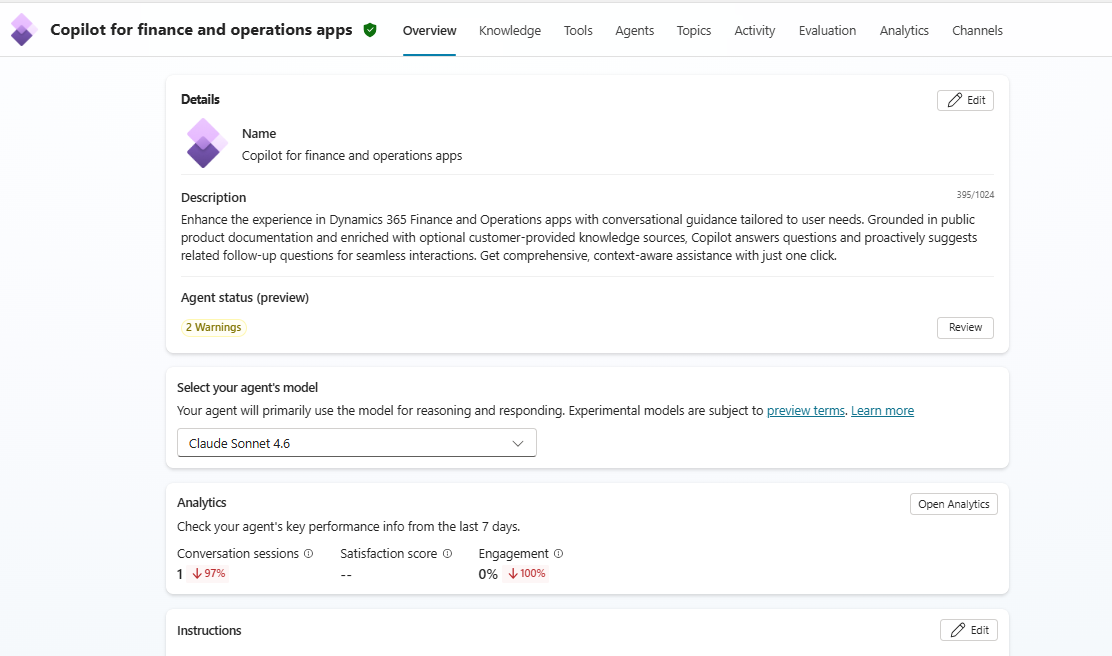
The standard behavior is to report to user a extended guide about the current form, or guide the user to do something in the system, providing a step by step guide.
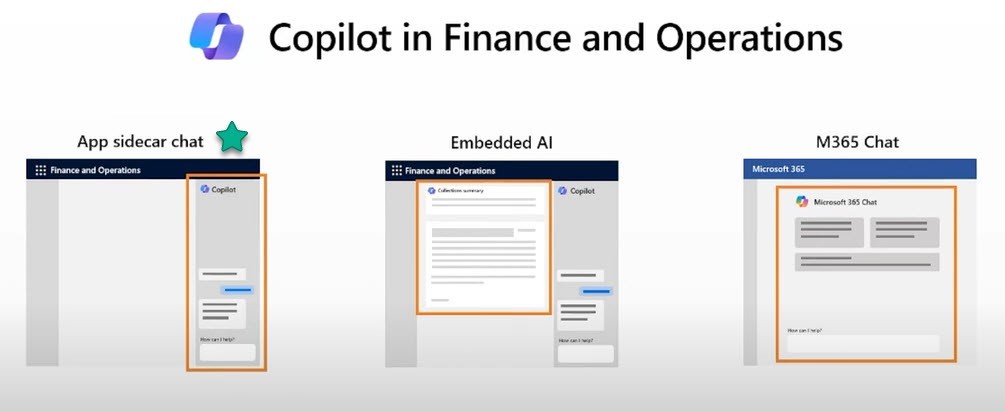
The standard right now.
- Works using classic topic management, the generative AI is turned off for now
- The model used is the base GTP model, you can change it, but you know, is always a standard component, not sure if persists this settings. In my opinion, not.
Let’s now deep dive to the concrete talk about what i do!
Zero Prompt
The first extension point I used is Copilot zero prompts.
https://learn.microsoft.com/en-us/dynamics365/fin-ops-core/dev-itpro/copilot/copilot-zero-prompt
The goal was to avoid starting from a generic empty chat. When Copilot is opened from a specific Finance & Operations form, the user should immediately see contextual actions related to that process. Sounds good!
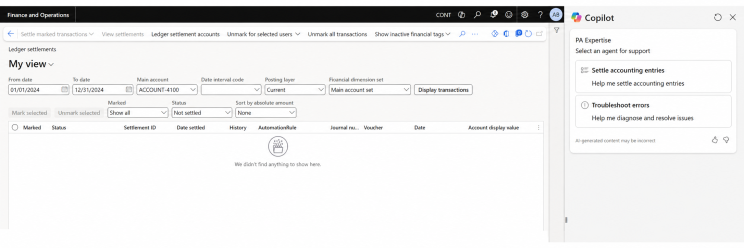
In my case, zero prompts were used to:
- associate Copilot suggestions with a specific F&O form;
- show predefined actions through an adaptive card;
- guide the user toward the intended process;
- keep the entry point inside the standard Copilot Chat experience.
— Is a preview feature, you have to enable it
Reading the Runtime Context and Passing Context Back to Copilot
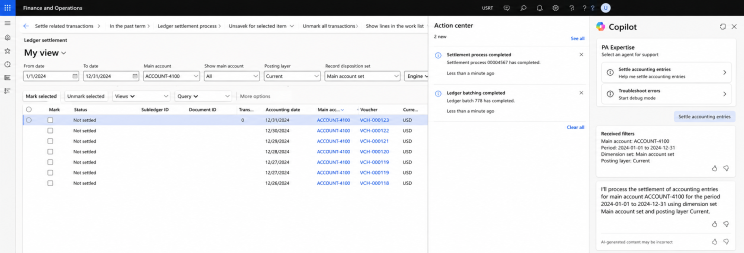
After the zero prompt entry point, the next step was to retrieve the actual context already prepared by the user in the F&O form. This was the most important technical discovery of the experiment. This is a goal feature, for user is much simple to talk to an agent already know my form contest.
Out of the box you can retrieve the main data source context, the form we are, and so, but not retrieving other form control values.
It’s some trickly for me enter in this mindset, normally in Finance & Operations we usually think about integrations through backend patterns: OData, custom services, data entities, batch processes, or external APIs. In this case, the key point was different: the Copilot action is executed in the context of the active client session, using JS call became from custom control, allowing access to the FormRun runtime form instance. This allow US to retrieve form controls values.
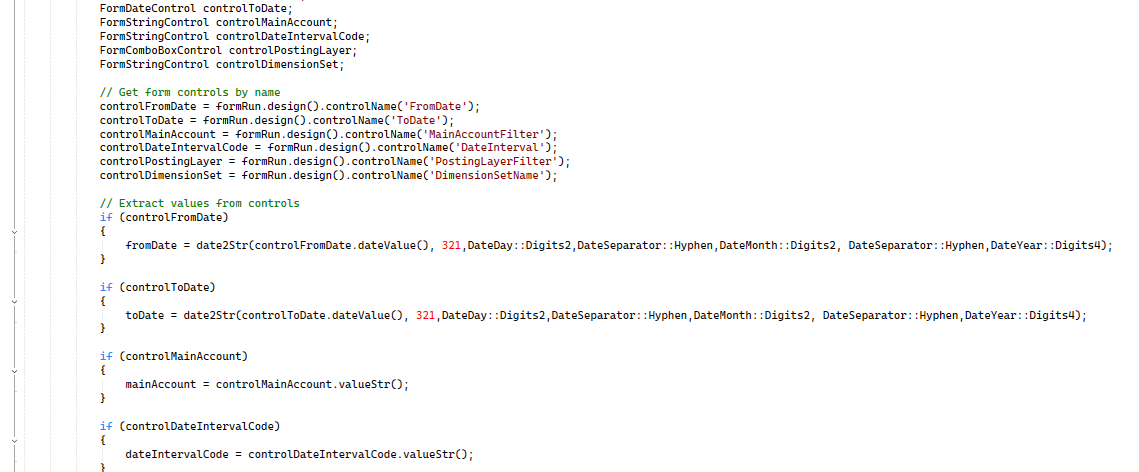
You have to create a couple of topic to do that, one for trigger the action and another one to get back the values, but not the scope of this document, all documentation can be found here. If you need sample code i can provide it, send me a message.
https://ariste.info/2025/09/create-client-plugins-copilot-studio-d365-fo/
The Hard Part, the Agent Part
Once the form context was collected and passed back to Copilot, the next step seemed straightforward: delegate the real work to a specialized agent.
In practice, this became the most complex part of the experiment. The goal was to keep the user inside the standard Finance & Operations Copilot Chat, while using a dedicated agent to analyze business data, interact through MCP, propose actions, and guide the user through the process.
I’ve already got created a specialized Agent, but there some obstacle where i try to call it.
I tested three main approaches:
- External agent > That the first try, call my agent, worked outside F&O.
- Child agent > Technically promising, but unstable for advanced multi-step orchestration
- Agent Flow > Worked, but introduced a synchronous timeout limitation
Attempt 1: External Agent Integration
The first idea was to reuse an mine external specialized agent that was already working well outside Finance & Operations. The agent could reason on the process, use MCP, retrieve data, and guide the user correctly. I’ve got the user contest, in my mind i have only to pass the work to that agent.
The problem was the integration point.
Inside the standard F&O Copilot Chat experience, delegating the conversation directly to an external agent didn’t work. Right not you cannot call external agents, may be in the future.
Attempt 2: Child Agent
The second approach was to use a child agent inside the standard Finance & Operations agent.
https://learn.microsoft.com/en-us/microsoft-copilot-studio/add-agent-child-agent
On paper, this looked closer to the expected architecture: keep the conversation inside the standard Copilot experience and delegate a specific task to a more focused agent.
However, this introduced several issues:
- AI orchestration must to be enabled to use MCP
- Context passing was not always reliable;
- The conversation sometimes entered loops;
- Multi-turn process guidance was not stable enough.
The child agent could start, and in some cases it could even receive the initial context, but it did not provide the continuity required for a real guided business process.
For simple scenarios, this approach may still be valid. But not mine for complex one.
For my scenario, it was not enough. I’ll try various approach of course, none works.
Attempt 3: Agent Flow
The third approach was based on Agent Flow, where the topic demand the flow a part of the work. This was the first approach that really worked inside the standard flow of the conversation.
The topic collected the form context, called the Agent Flow, and the flow invoked the specialized agent. The agent was able to use MCP, retrieve data, process the request, and return a response.
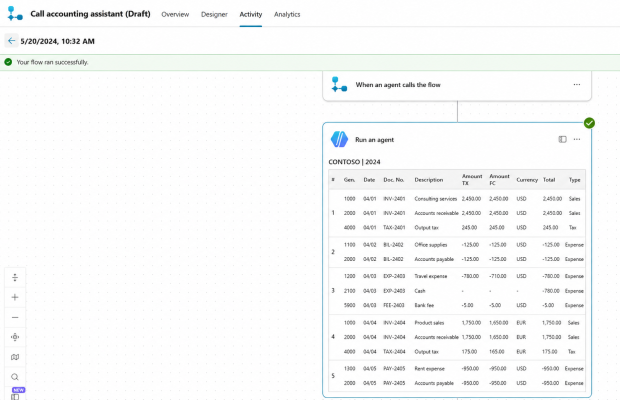
So yes: this worked.
This approach allowed me to keep the user inside the standard Finance & Operations Copilot Chat experience, while still delegating the actual reasoning to a specialized agent.
But with an important limitation. Agent Flow is synchronous and has a timeout of 2 minutes. In my case, the process could exceed the available execution time, especially when the number of records increased.
My DO and DON’T List
After these attempts, I ended up with a clearer view of what works well and what should be avoided when extending the standard Copilot Chat experience in Dynamics 365 Finance & Operations.
DO use zero prompts Use zero prompts to create a contextual entry point from a specific F&O form.
DON’T start from an empty generic chat The user should immediately understand what Copilot can do in that specific business context.
DO read the runtime context from the active form If the user has already entered filters, selected records, or prepared a context, reuse it.
DON’T ask the user to re-enter data manually The ERP already knows the context. The assistant should start from there.
DO use form actions and client plugins for lightweight context collection They are very useful to retrieve form values and pass them back to Copilot.
DON’T use this layer for heavy business logic Keep it focused on context retrieval, not process execution.
DO pass data using a simple JSON payload Keep the structure clean, typed, and easy to consume in the next step.
DON’T overcomplicate the payload Avoid unnecessary data, complex structures, or unsupported return types.
DO use Agent Flow as the integration bridge For me, Agent Flow became the most practical solution to connect the standard F&O Copilot Chat with a specialized agent.
DON’T assume external agents can be directly embedded everywhere A working external agent does not automatically mean a smooth embedded sidecar experience.
Separate in little task the Agent Using agent flow and topics you can control better the execution.
DON’T call heavy agents and log processing tasks to avoid timeouts limitations of agent flows.
An early adopter story
After many attempts, wrong turns, unstable behaviors, limitations, timeouts, and a fair amount of frustration, the result is much clearer than before
I now know what can be done, what should be avoided, and which pattern makes sense today.
That is a successful outcome.
Maybe not the “everything works exactly as I dreamed” kind of success, but the more useful kind: the one that gives you a better design, a better understanding of the platform, and a clearer path for the next implementation.
This is, for me, the beauty of being an early adopter.
You try before everything is perfectly documented. You push the platform close to its current limits. You hit walls. You learn. And sometimes, even when the first idea changes shape, you come back with something better.
The agent will still be built. The approach will simply be more mature.
And that makes this experiment a success.
Disclaimer
This article was written with the support of AI, but the tests, the mistakes, the late evenings, the excitement, and the frustration were completely human.
A special thanks to my company for supporting this kind of experimentation and for believing that this AI revolution is not something to watch from the sidelines, but something to explore from the inside.
A special thanks to a fellow community member, give me a couple of true suggestions.