Virtual ZPL Printer for D365FO
A free D365FO utility that previews ZPL warehouse labels through the Labelary API, with no local virtual printer to install.
- Published
- Versions
- D365FO
- 3 min read
In many real-world implementations of Microsoft Dynamics 365 Finance & Operations, testing warehouse labels quickly and efficiently can become unnecessarily complex.
When working with ZPL (Zebra Programming Language) labels, developers and functional consultants often need a fast way to preview the output generated by the system. However, the traditional approach typically requires installing virtual printers locally — a process that can be cumbersome, time-consuming, and impractical, especially when you simply need to perform a quick validation during development or troubleshooting.
To address this need, I developed a lightweight utility that allows you to preview ZPL labels directly within D365FO, without requiring any local virtual printer installation.
This tool was created specifically to enable fast consultation of label output during development and testing phases. It is not intended to replace Microsoft’s native and recommended tools, which remain the appropriate choice for more complex, production-ready scenarios.
From a technical perspective, the solution leverages the Labelary API (https://labelary.com/service.html). While the free version of the service comes with certain limitations, it is perfectly suitable for development and testing purposes.
How It Works – Screens Overview
1. Creating the Virtual Printer
The first step consists of creating a new virtual printer from the organization printers.
- Navigate to Organization administration > Setup > Network printers
- Select the Initialize ZPL printer
- You can insert the name of the printer and label size
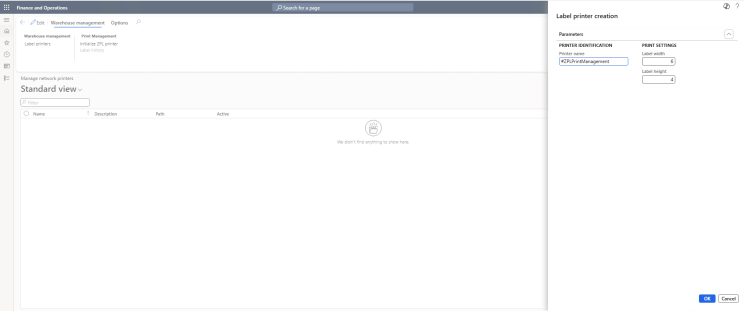
Virtual printer creation
At the end a new printer will be created
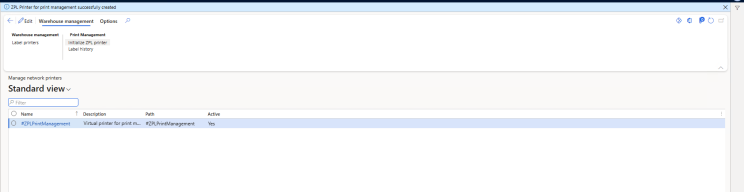
Virtual printer created
Using the Label Printers button on Warehouse Management (an extension button on network printers form) you can see the printer details on WHS settings table.

Details of printer
Each time a label is printed using the virtual printer a new record is created on Label History. Here you can see of course the preview, the core of this implementation, and the ZPL raw code.
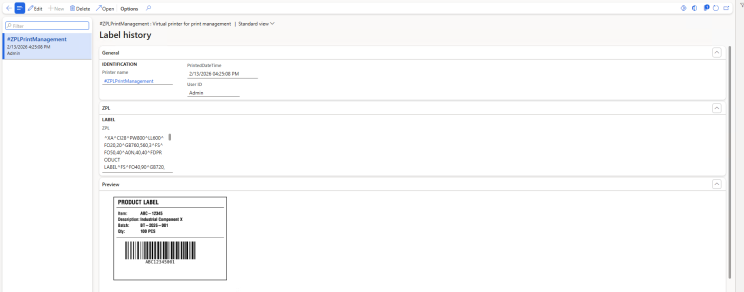
Preview of label
Diagnostics Mode
An additional useful feature is the Diagnostics flag, which can also be activated for all ZPL printers — not only for the virtual preview printer. When the Diagnostics option is enabled a record is created in the Label History and the raw ZPL code is stored. No preview rendering is generated in this case
This has two important advantages:
- It avoids consuming free API requests from Labelary
- It still provides immediate access to the generated ZPL for troubleshooting on production
In short, you can use the virtual ZPL printer to get a preview of the label, and diagnostic if you need only the ZPL
Source Control
The full source code is available on GitHub:
https://github.com/diegomancassola23/d365fo.utility
The repository includes:
- X++ project and model
- Setup instructions
- How to create label example
- Configuration guidance
Disclaimer
This article was written with the support of AI tools to improve clarity and structure.
However, the solution described is the result of hands-on experience built over more than 15 years working with Microsoft Dynamics 365 Finance & Operations and related technologies.
The utility is provided as a free component, intended for development and testing scenarios. It is not an official Microsoft extension, nor is it meant to replace recommended enterprise-grade label management solutions.
For any questions, technical discussions, issue or feedback and suggestions feel free to contact me privately.